> ## Documentation Index
> Fetch the complete documentation index at: https://docs.hop.io/llms.txt
> Use this file to discover all available pages before exploring further.
# Webhooks
> Learn about how you can utilize Hop webhooks in your applications to be notified of events in your project.
## Webhook Basics
### Creating Webhooks
You can create a webhook within our [console](https://console.hop.io/project/settings/webhooks) or through our [SDK]()
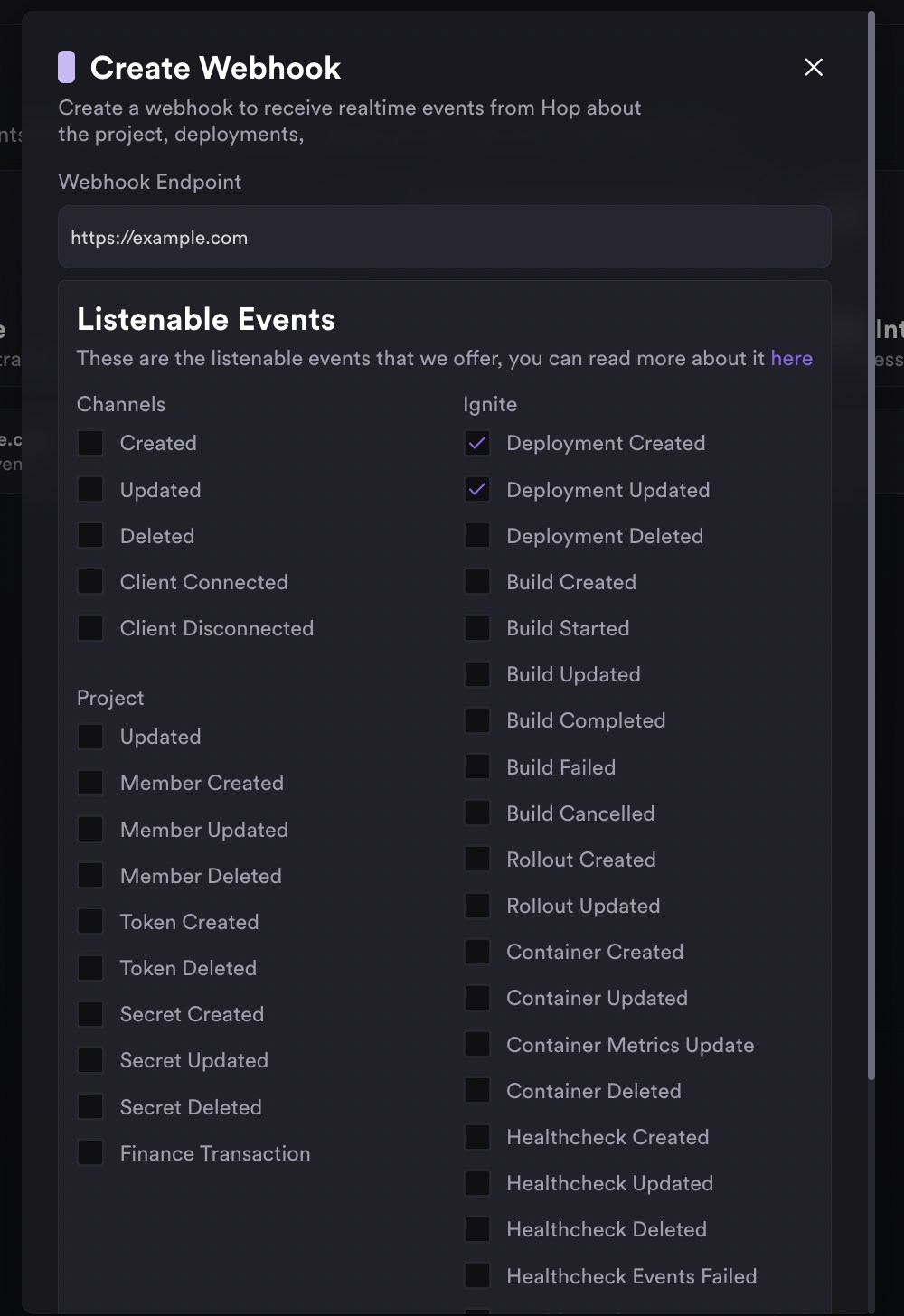
Navigate to Project Settings > Webhooks and select the events as follows
 ```ts TS theme={null}
import {Hop} from '@onehop/js';
const projectToken = 'ptk_xxx';
const hop = new Hop(projectToken);
const webhook = await hop.project.webhooks.create(
'https://example.com/webhook',
['ignite.deployment.container.metrics_update'],
);
console.log(webhook.id);
```
### Editing a Webhook
After creating a webhook, you can edit the events and endpoint that the webhook is associated with. Please refer to the [Events](#events) section for more information on the events that you can listen to.
Navigate to project settings and select the webhook you wish to edit
```ts TS theme={null}
import {Hop} from '@onehop/js';
const projectToken = 'ptk_xxx';
const hop = new Hop(projectToken);
const webhook = await hop.project.webhooks.create(
'https://example.com/webhook',
['ignite.deployment.container.metrics_update'],
);
console.log(webhook.id);
```
### Editing a Webhook
After creating a webhook, you can edit the events and endpoint that the webhook is associated with. Please refer to the [Events](#events) section for more information on the events that you can listen to.
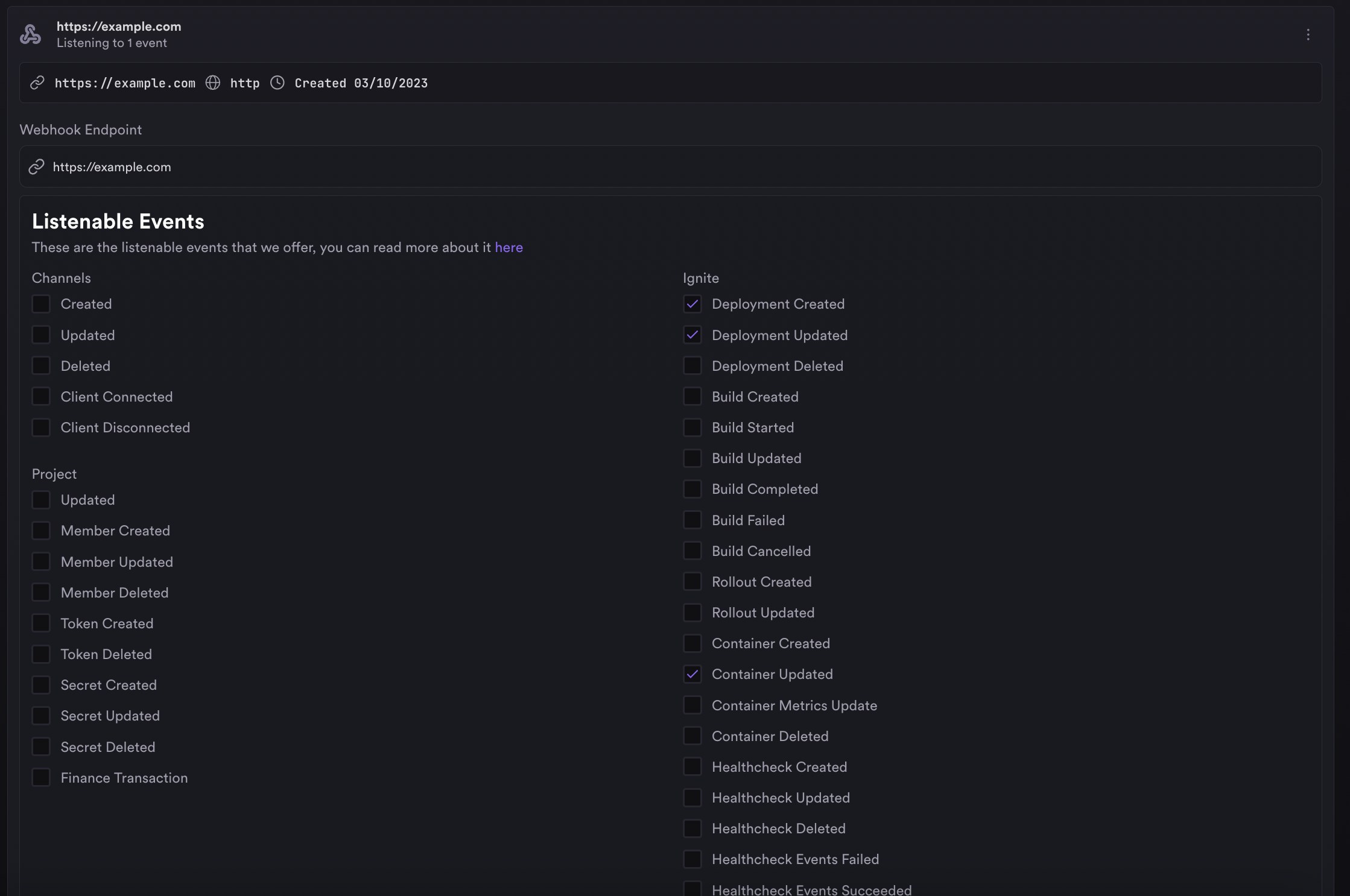
Navigate to project settings and select the webhook you wish to edit
 ```ts TS theme={null}
import {Hop} from '@onehop/js';
const projectToken = 'ptk_xxx';
const hop = new Hop(projectToken);
const webhook = await hop.project.webhooks.edit('webhook_xxx', {
events: ['ignite.deployment.container.metrics_update'],
webhookUrl: 'https://example.com/webhook',
});
console.log(webhook);
```
### Regenerating Webhook Secret
You can regenerate the secret associated with a webhook. This will invalidate the previous secret, and you will need to update your application to use the new secret in order to correctly verify the webhook payload.
Navigate to Project Settings > Click the three dots of your chosen webhook > Regenerate Secret
```ts TS theme={null}
import {Hop} from '@onehop/js';
const projectToken = 'ptk_xxx';
const hop = new Hop(projectToken);
const webhook = await hop.project.webhooks.edit('webhook_xxx', {
events: ['ignite.deployment.container.metrics_update'],
webhookUrl: 'https://example.com/webhook',
});
console.log(webhook);
```
### Regenerating Webhook Secret
You can regenerate the secret associated with a webhook. This will invalidate the previous secret, and you will need to update your application to use the new secret in order to correctly verify the webhook payload.
Navigate to Project Settings > Click the three dots of your chosen webhook > Regenerate Secret
 ```ts TS theme={null}
import {Hop} from '@onehop/js';
const projectToken = 'ptk_xxx';
const hop = new Hop(projectToken);
const secret = await hop.project.webhooks.regenerateSecret('webhook_xxx');
console.log(secret);
```
### Deleting a Webhook
After creating a webhook, you can delete it at any time. This will instantly invalidate the webhook, and Hop will no longer send any requests to the endpoint associated with the webhook.
Navigate to Project Settings > Click the three dots of your chosen webhook > Delete Webhook
```ts TS theme={null}
import {Hop} from '@onehop/js';
const projectToken = 'ptk_xxx';
const hop = new Hop(projectToken);
const secret = await hop.project.webhooks.regenerateSecret('webhook_xxx');
console.log(secret);
```
### Deleting a Webhook
After creating a webhook, you can delete it at any time. This will instantly invalidate the webhook, and Hop will no longer send any requests to the endpoint associated with the webhook.
Navigate to Project Settings > Click the three dots of your chosen webhook > Delete Webhook
 ```ts TS theme={null}
import {Hop} from '@onehop/js';
const projectToken = 'ptk_xxx';
const hop = new Hop(projectToken);
await hop.project.webhooks.delete('webhook_xxx');
```
## Webhook Payload
### Request Headers
With every webhook request sent to your endpoint, Hop will include a signature header. This will help you verify that the request is coming from Hop, and not a malicious/third-party source.
Header Example:
```http theme={null}
X-Hop-Hooks-Signature: 86EBE7F54A92C809CDF8F3DC6536C566A1C074F9B001E9118DF7EC433BE435E7
```
### Request Body
When an event occurrs that the webhook is listening to, Hop will send a POST request to the endpoint you specified when creating the webhook. The request body will contain a JSON object.
Body Example:
```json theme={null}
{
"webhook_id": "webhook_MTkzMDU5MTE4NzcyNDA0MjI3",
"project_id": "project_MTY1MjU5NTk1NTAwNTY4NTc3",
"occurred_at": "2023-10-02T15:46:13.323Z",
"id": "event_MTkzMzkwODU2OTQwODkyMjgx",
"event": "ignite.deployment.container.metrics_update",
"data": {
"metrics": {
"memory_usage_percent": "0.07",
"memory_usage_bytes": 393216,
"cpu_usage_percent": "0.00"
},
"container_id": "container_MTkzMDc3MjExODczMDc5MzAx"
}
}
```
### Verify Webhook Payload
To verify the webhook payload to ensure that it is coming from Hop, we provide a utility function in the @onehop/js SDK.
Similar to the Stripe SDK, you can also construct an event to get type safe access to the webhook payload.
```ts TS theme={null}
import {constructEvent} from '@onehop/js';
try {
const event = constructEvent(
stringedJSONBody,
webhookSignatureHeader,
webhookSecret,
);
console.log(event.id, event.data);
} catch (err) {
// handle error ("Invalid signature")
}
```
## Example
For a full example using express - see [here](https://github.com/hop-examples/webhooks-example)
## Events
### Ignite
| ID | Name |
| ---------------------------------------------- | ---------------------------- |
| ignite.deployment.created | Deployment Created |
| ignite.deployment.updated | Deployment Updated |
| ignite.deployment.deleted | Deployment Deleted |
| ignite.deployment.build.created | Build Created |
| ignite.deployment.build.started | Build Started |
| ignite.deployment.build.updated | Build Updated |
| ignite.deployment.rollout.created | Rollout Created |
| ignite.deployment.rollout.updated | Rollout Updated |
| ignite.deployment.container.created | Container Created |
| ignite.deployment.container.updated | Container Updated |
| ignite.deployment.container.metrics\_update | Container Metrics Update |
| ignite.deployment.container.deleted | Container Deleted |
| ignite.deployment.healthcheck.created | Healthcheck Created |
| ignite.deployment.healthcheck.updated | Healthcheck Updated |
| ignite.deployment.healthcheck.deleted | Healthcheck Deleted |
| ignite.deployment.healthcheck.events.failed | Healthcheck Events Failed |
| ignite.deployment.healthcheck.events.succeeded | Healthcheck Events Succeeded |
| ignite.deployment.gateway.created | Gateway Created |
| ignite.deployment.gateway.updated | Gateway Updated |
| ignite.deployment.gateway.deleted | Gateway Deleted |
### Project
| ID | Name |
| --------------------------- | ------------------- |
| project.updated | Updated |
| project.member.created | Member Created |
| project.member.updated | Member Updated |
| project.member.deleted | Member Deleted |
| project.tokens.created | Token Created |
| project.tokens.deleted | Token Deleted |
| project.secrets.created | Secret Created |
| project.secrets.updated | Secret Updated |
| project.secrets.deleted | Secret Deleted |
| project.finance.transaction | Finance Transaction |
```ts TS theme={null}
import {Hop} from '@onehop/js';
const projectToken = 'ptk_xxx';
const hop = new Hop(projectToken);
await hop.project.webhooks.delete('webhook_xxx');
```
## Webhook Payload
### Request Headers
With every webhook request sent to your endpoint, Hop will include a signature header. This will help you verify that the request is coming from Hop, and not a malicious/third-party source.
Header Example:
```http theme={null}
X-Hop-Hooks-Signature: 86EBE7F54A92C809CDF8F3DC6536C566A1C074F9B001E9118DF7EC433BE435E7
```
### Request Body
When an event occurrs that the webhook is listening to, Hop will send a POST request to the endpoint you specified when creating the webhook. The request body will contain a JSON object.
Body Example:
```json theme={null}
{
"webhook_id": "webhook_MTkzMDU5MTE4NzcyNDA0MjI3",
"project_id": "project_MTY1MjU5NTk1NTAwNTY4NTc3",
"occurred_at": "2023-10-02T15:46:13.323Z",
"id": "event_MTkzMzkwODU2OTQwODkyMjgx",
"event": "ignite.deployment.container.metrics_update",
"data": {
"metrics": {
"memory_usage_percent": "0.07",
"memory_usage_bytes": 393216,
"cpu_usage_percent": "0.00"
},
"container_id": "container_MTkzMDc3MjExODczMDc5MzAx"
}
}
```
### Verify Webhook Payload
To verify the webhook payload to ensure that it is coming from Hop, we provide a utility function in the @onehop/js SDK.
Similar to the Stripe SDK, you can also construct an event to get type safe access to the webhook payload.
```ts TS theme={null}
import {constructEvent} from '@onehop/js';
try {
const event = constructEvent(
stringedJSONBody,
webhookSignatureHeader,
webhookSecret,
);
console.log(event.id, event.data);
} catch (err) {
// handle error ("Invalid signature")
}
```
## Example
For a full example using express - see [here](https://github.com/hop-examples/webhooks-example)
## Events
### Ignite
| ID | Name |
| ---------------------------------------------- | ---------------------------- |
| ignite.deployment.created | Deployment Created |
| ignite.deployment.updated | Deployment Updated |
| ignite.deployment.deleted | Deployment Deleted |
| ignite.deployment.build.created | Build Created |
| ignite.deployment.build.started | Build Started |
| ignite.deployment.build.updated | Build Updated |
| ignite.deployment.rollout.created | Rollout Created |
| ignite.deployment.rollout.updated | Rollout Updated |
| ignite.deployment.container.created | Container Created |
| ignite.deployment.container.updated | Container Updated |
| ignite.deployment.container.metrics\_update | Container Metrics Update |
| ignite.deployment.container.deleted | Container Deleted |
| ignite.deployment.healthcheck.created | Healthcheck Created |
| ignite.deployment.healthcheck.updated | Healthcheck Updated |
| ignite.deployment.healthcheck.deleted | Healthcheck Deleted |
| ignite.deployment.healthcheck.events.failed | Healthcheck Events Failed |
| ignite.deployment.healthcheck.events.succeeded | Healthcheck Events Succeeded |
| ignite.deployment.gateway.created | Gateway Created |
| ignite.deployment.gateway.updated | Gateway Updated |
| ignite.deployment.gateway.deleted | Gateway Deleted |
### Project
| ID | Name |
| --------------------------- | ------------------- |
| project.updated | Updated |
| project.member.created | Member Created |
| project.member.updated | Member Updated |
| project.member.deleted | Member Deleted |
| project.tokens.created | Token Created |
| project.tokens.deleted | Token Deleted |
| project.secrets.created | Secret Created |
| project.secrets.updated | Secret Updated |
| project.secrets.deleted | Secret Deleted |
| project.finance.transaction | Finance Transaction |