> ## Documentation Index
> Fetch the complete documentation index at: https://docs.hop.io/llms.txt
> Use this file to discover all available pages before exploring further.
# Project Secrets
> Project secrets act as a global secure secret store for each project on Hop. Secrets can be referenced in deployments as environment variables and will automatically be populated when a container starts
Secrets can be **created**, **updated** and **deleted** through the API, CLI,
SDK or console, however they cannot be viewed. Only the container runtimes can view secrets they've been granted under environment variables.
## Secret Names
Secret names are limited to 64 characters in length, must be alphanumeric (with
underscores) and are automatically uppercased.
📝 Secret name regex, for your convenience: `^[a-zA-Z0-9_]{1,64}$`
## Managing Secrets
### Creating or Updating a Secret
With the CLI, you can manage secrets with the `hop secrets` command:
```bash theme={null}
hop secrets set
```
### Deleting a Secret
```bash theme={null}
hop secrets rm
```
You can manage secrets using the Hop Console on the [Project
Secrets](https://console.hop.io/project/settings/secrets) page under project
settings.
## Using Secrets
### In Hop Deployments
When creating a deployment or individual container, you can set environment
variables that point to project secrets. Their values will automatically be
updated when you update the secrets.
Every field where you'd usually put an environment value is compatible with
secrets - you can just use `${SECRETS.NAME}` (where `NAME` is the secret key
name) and Hop will automatically replace it with the value when a container
starts.
#### Usage with `hop deploy`
When using `hop deploy`, you can specify environment variables with `-e` or
`--env`, so: for example, if I wanted to reference a project secret named
`REDIS_URI` in my deployment, I'd execute the following command:
```bash theme={null}
hop deploy --env REDIS_URI="${SECRETS.REDIS_URI}"
```
#### Usage with Console
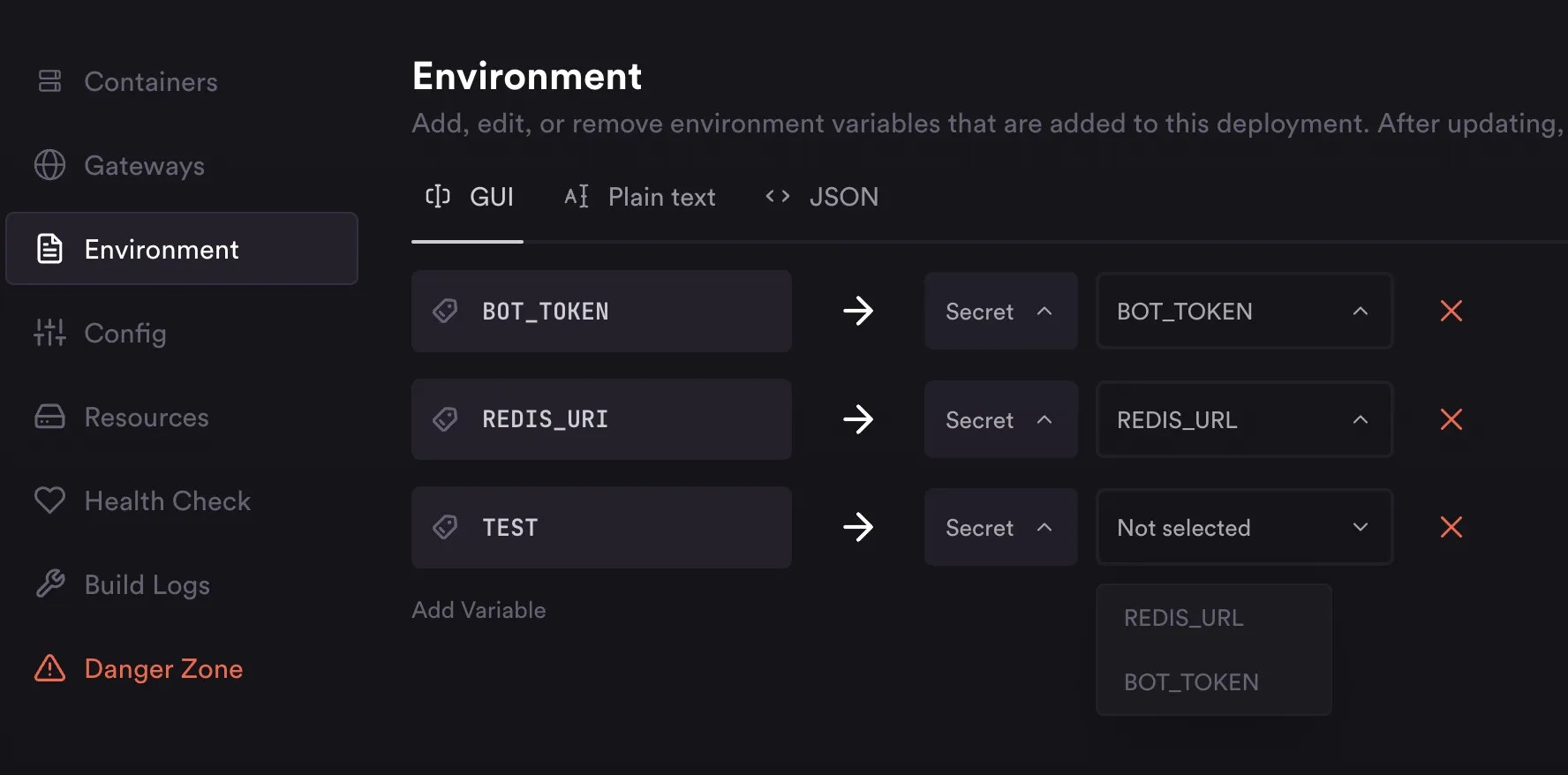
When creating a deployment, or when using the **Environment** tab in your
deployment, you can set environment variable values to secret keys:
 #### Usage with API
When setting environment variable values on API requests, you can just refer to
secrets like you would with the CLI: `${SECRETS.NAME}`
#### Usage with API
When setting environment variable values on API requests, you can just refer to
secrets like you would with the CLI: `${SECRETS.NAME}`